비트코인 노드 운용해보기: Bitcoin Core 설치·채굴·전송
Bitcoin Core를 이용해 로컬 regtest 노드를 띄우고, 블록 생성·보상·송금·확정까지 핵심 흐름을 직접 타이핑하며 따라갑니다. 실습 친화적 체크리스트 포함.
이 글을 통해 Bitcoin Core로 로컬(regtest) 노드를 직접 띄우고 트랜잭션까지 완결하는 흐름을 빠르게 익힙니다. Mac/Linux와 CLI에 익숙해지는 데 도움을 줍니다.
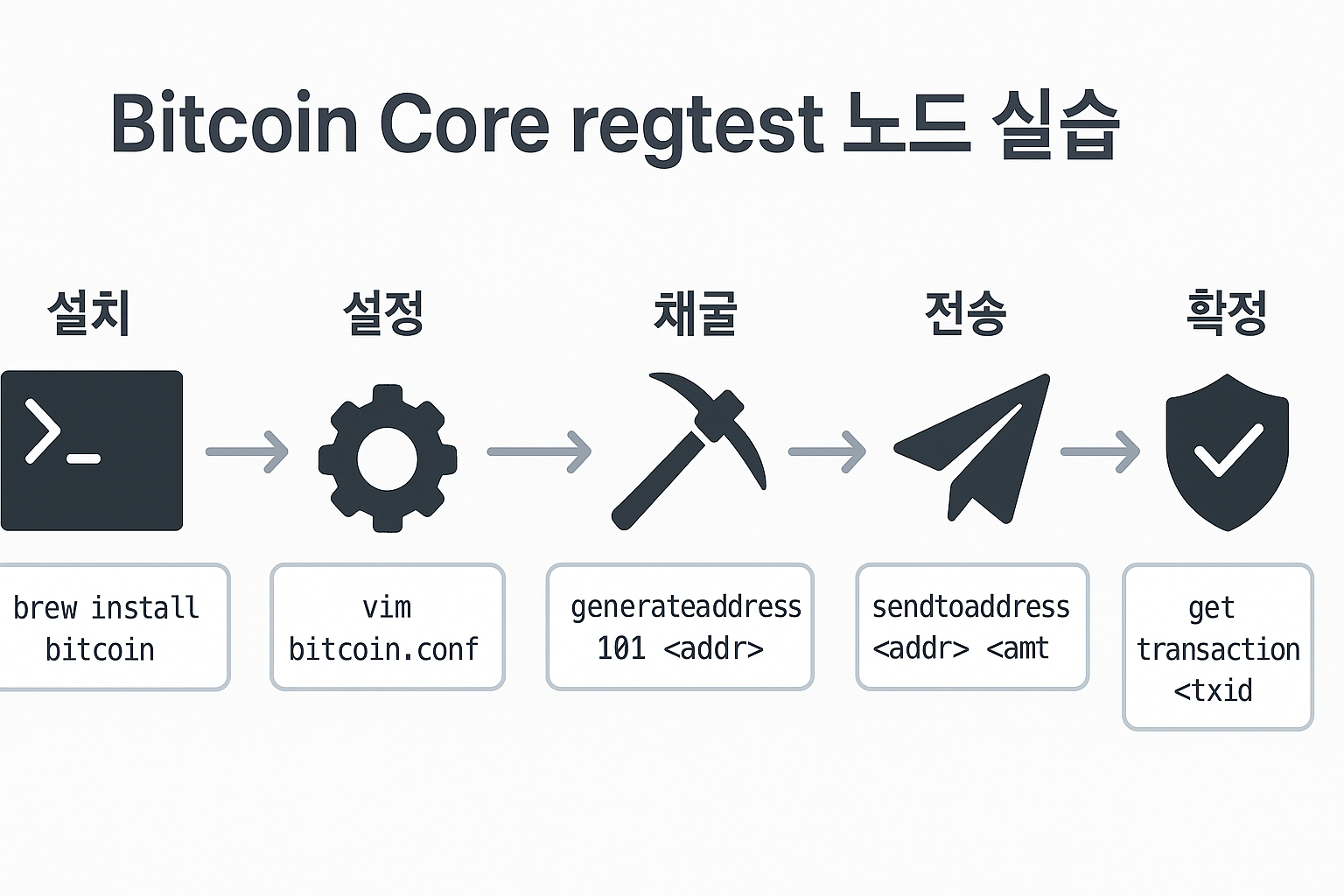
준비물 한눈에
- 유닉스 계열 OS(Mac/Linux)와 터미널 접근.
- Homebrew(맥),
vim또는 선호하는 에디터. - 저장 폴더(예:
~/bitcoin_data)와 충분한 디스크.
주의: 실습은 regtest 로컬 체인에서 진행합니다. 실제 가치가 없으며 안전하게 반복 실험할 수 있습니다.
설치와 초기 설정
- Homebrew 확인:
brew --version
- Homebrew가 없다면 설치:
/bin/bash -c "$(curl -fsSL https://raw.githubusercontent.com/Homebrew/install/HEAD/install.sh)"
- Bitcoin Core 설치:
brew install bitcoin
bitcoin-cli --version
이제 데이터 디렉토리를 만들고 설정 파일을 생성합니다.
mkdir -p ~/bitcoin_data && cd ~/bitcoin_data
pwd   # 경로를 메모
vim bitcoin.conf
아래와 유사하게 입력 후 저장(I→입력→ESC→:wq):
regtest=1
server=1
rpcuser=user
rpcpassword=password
datadir=/위에서_확인한_경로
fallbackfee=0.0002
팁: vim bitcoin.conf로 다시 열어 오탈자를 점검하세요. rpcuser/rpcpassword는 CLI 인증에 사용됩니다.
로컬 체인 가동하기
터미널을 하나 더 열어 데몬을 시작합니다.
bitcoind -conf=/경로/bitcoin.conf
기존 터미널에서 상태 확인:
bitcoin-cli -conf=/경로/bitcoin.conf getblockchaininfo
출력의 "chain": "regtest"를 확인하세요. blocks와 headers는 0, verificationprogress는 1(동기화 완료)이면 정상입니다.
주의: 데몬 로그를 함께 보면서 명령 입력에 따른 변화(새 블록, 트랜잭션 브로드캐스트)를 관찰하세요.
블록 생성과 보상 이해
먼저 지갑을 만들고 주소를 받습니다.
bitcoin-cli -conf=/경로/bitcoin.conf createwallet "mywallet"
bitcoin-cli -conf=/경로/bitcoin.conf getnewaddress
지갑이 로드되지 않았다는 메시지가 나오면:
bitcoin-cli -conf=/경로/bitcoin.conf loadwallet "mywallet"
이제 블록을 묶습니다(채굴)
bitcoin-cli -conf=/경로/bitcoin.conf generatetoaddress 101 <내_주소>
- 왜 101개인가? 첫 블록의 코인베이스 보상은 100 컨펌 후에만 사용 가능합니다(coinbase maturity). 따라서 1+100=101 블록이 필요합니다.
잔액 확인:
bitcoin-cli -conf=/경로/bitcoin.conf getbalance
regtest 기본 보상은 50 tBTC이며, 첫 보상은 100컨펌 이후 유효해집니다.
핵심 전제: 코인베이스 트랜잭션은 체인 리오르그 위험을 줄이기 위해 100블록 성숙 기간을 둡니다.
전송과 확정(컨펌) 실습
새 수신 주소를 한 개 더 생성합니다.
bitcoin-cli -conf=/경로/bitcoin.conf getnewaddress
보내기:
bitcoin-cli -conf=/경로/bitcoin.conf sendtoaddress <받는_주소> <금액>
트랜잭션 조회:
bitcoin-cli -conf=/경로/bitcoin.conf gettransaction <txid>
confirmations: 0이면 블록에 포함 전인 잠정 상태입니다. 확정을 위해 소수의 블록을 더 생성합니다.
bitcoin-cli -conf=/경로/bitcoin.conf generatetoaddress 10 <내_주소>
bitcoin-cli -conf=/경로/bitcoin.conf gettransaction <txid>
이제 confirmations가 증가하며 트랜잭션이 확정됩니다. 수신 내역은 다음으로도 확인합니다.
bitcoin-cli -conf=/경로/bitcoin.conf listreceivedbyaddress 0 true
현재까지 요약
설치 (Install)
  └─ Homebrew 설치/확인:
       brew --version
       /bin/bash -c "$(curl -fsSL https://raw.githubusercontent.com/Homebrew/install/HEAD/install.sh)"
  └─ Bitcoin Core 설치/확인:
       brew install bitcoin
       bitcoin-cli --version

설정 (Configure)
  └─ 데이터 디렉토리:
       mkdir -p ~/bitcoin_data && cd ~/bitcoin_data && pwd
  └─ 설정 파일 편집:
       vim bitcoin.conf
       # 내용 예시
       regtest=1
       server=1
       rpcuser=user
       rpcpassword=password
       datadir=/위에서_확인한_경로
       fallbackfee=0.0002

가동 (Run Daemon)
  └─ 데몬 시작(새 터미널):
       bitcoind -conf=/경로/bitcoin.conf
  └─ 체인 상태 확인:
       bitcoin-cli -conf=/경로/bitcoin.conf getblockchaininfo
       # "chain": "regtest" 확인

채굴 (Mine / Generate Blocks)
  └─ 지갑/주소:
       bitcoin-cli -conf=/경로/bitcoin.conf createwallet "mywallet"
       bitcoin-cli -conf=/경로/bitcoin.conf getnewaddress
  └─ 블록 생성(코인베이스 성숙용 101개):
       bitcoin-cli -conf=/경로/bitcoin.conf generatetoaddress 101 <내_주소>
  └─ 잔액 확인:
       bitcoin-cli -conf=/경로/bitcoin.conf getbalance

전송 (Send)
  └─ 새 주소 생성:
       bitcoin-cli -conf=/경로/bitcoin.conf getnewaddress
  └─ 송금:
       bitcoin-cli -conf=/경로/bitcoin.conf sendtoaddress <받는_주소> <금액>
  └─ 트랜잭션 조회:
       bitcoin-cli -conf=/경로/bitcoin.conf gettransaction <txid>
       # confirmations=0 → 미확정(잠정)

확정 (Confirm)
  └─ 확정용 추가 블록 생성:
       bitcoin-cli -conf=/경로/bitcoin.conf generatetoaddress 10 <내_주소>
  └─ 트랜잭션 재확인:
       bitcoin-cli -conf=/경로/bitcoin.conf gettransaction <txid>
       # confirmations↑ → 확정
  └─ 수신 내역 확인:
       bitcoin-cli -conf=/경로/bitcoin.conf listreceivedbyaddress 0 true
명령 요약 표
| 목적 | 명령 | 비고 |
|---|---|---|
| 데몬 실행 | bitcoind -conf=/경로/bitcoin.conf | 별도 터미널 |
| 체인 정보 | bitcoin-cli ... getblockchaininfo | regtest 확인 |
| 지갑 생성 | ... createwallet "mywallet" | 최초 1회 |
| 주소 생성 | ... getnewaddress | 수신/채굴 보상 |
| 블록 생성 | ... generatetoaddress 101 | 코인베이스 성숙 |
| 잔액 확인 | ... getbalance | tBTC 단위 |
| 전송 | ... sendtoaddress | 수수료는 fallbackfee |
| 트랜잭션 조회 | ... gettransaction | 컨펌 수 확인 |
주의: 실습 경로(/경로/bitcoin.conf)는 실제 pwd 결과로 교체하세요. RPC 인증 정보는 로컬 용도라도 외부 유출을 피하세요.
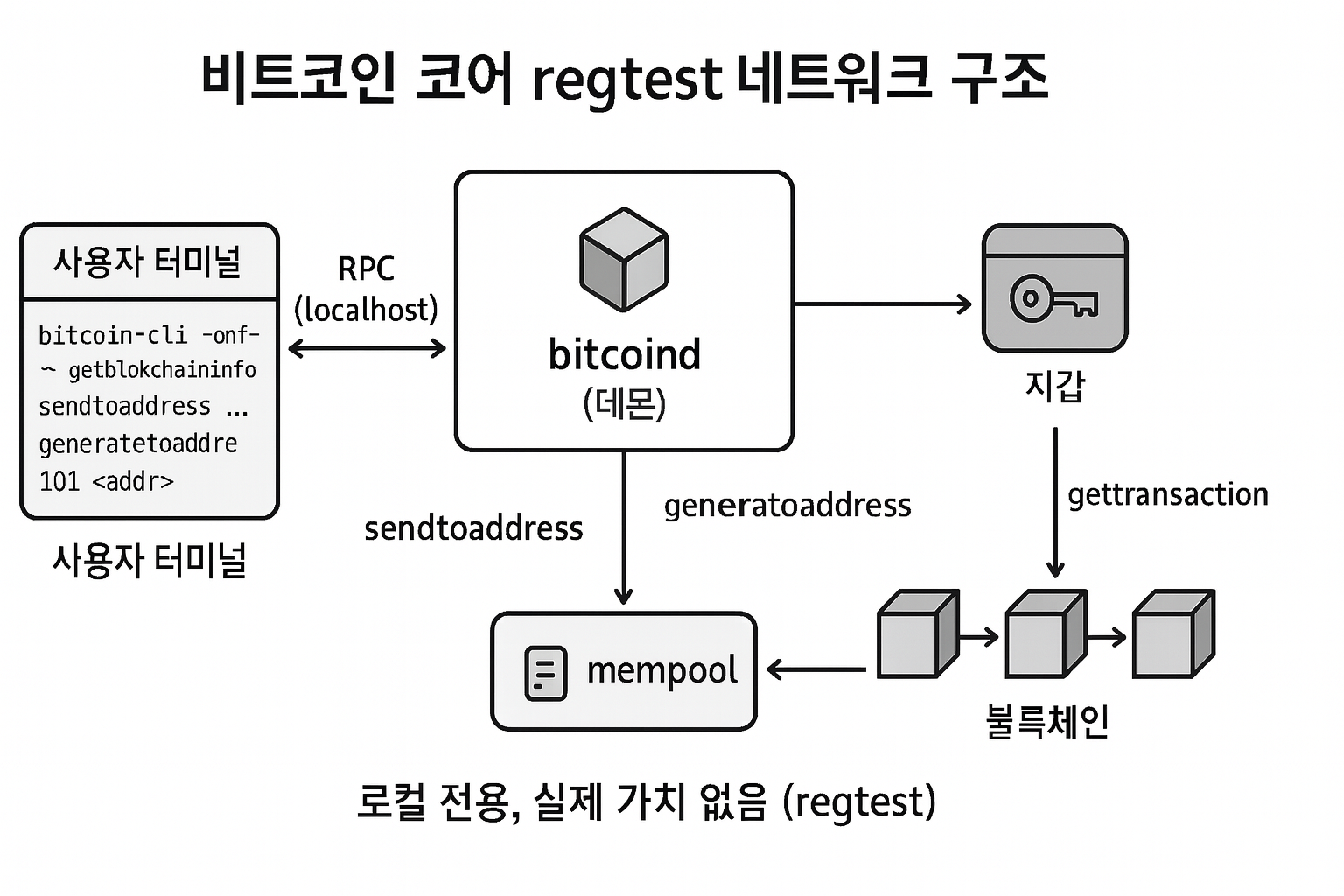
종료와 다음 단계
실습을 마쳤다면 데몬을 종료합니다.
(Control + C)
이후에는 테스트 스크립트화, bitcoin-cli -named 옵션 활용, sendrawtransaction로 원시 트랜잭션 브로드캐스트 등으로 확장할 수 있습니다.